
15 Selenium Best Practices For Efficient Test Automation [2026]
Optimize your web testing with 15 essential Selenium best practices for stable, maintainable test automation in 2026. Cut flake rate and ship faster.

Himanshu Sheth
May 5, 2026
On This Page
- 15 Selenium Best Practices
- 1. Avoid Blocking Sleep Calls
- 2. Name Test Cases & Suites
- 3. Set Browser Zoom to 100%
- 4. Maximize the Browser Window
- 5. Choose the Right Web Locator
- 6. Browser Compatibility Matrix
- 7. Logging and Reporting
- 8. Use Page Object Model
- 9. Use BDD with Selenium
- 10. Uniform Directory Structure
- 11. Data-Driven Testing
- 12. Avoid Single Driver Pattern
- 13. Autonomous Test Design
- 14. Assert vs Verify
- 15. Leverage Parallel Testing
- Selenium Worst Practices
Most flaky Selenium suites do not fail because the test logic is wrong. They fail because of the same handful of design mistakes: blocking sleep calls, brittle locators, shared state across tests, and a single-driver setup that ties scripts to one browser.

Selenium 4 is built on the W3C WebDriver Recommendation, ratified on 5 June 2018. That standardization is why the same Selenium script can drive Chrome, Edge, Firefox, and Safari without vendor-specific shims. Adopting practices that match this contract (explicit waits, page objects, isolated tests) lets your test automation stop fighting the browser and start scaling.
This article walks through 15 Selenium best practices and 7 worst practices to avoid. The recommendations apply across Java, Python, C#, JavaScript, and Ruby bindings.
Key Takeaways
- Replace Thread.sleep and time.sleep with Selenium's Implicit and Explicit waits. Fixed-duration sleeps are the single largest source of flakiness and wasted CI time.
- Pick locators in this order: ID, Name, data-testid, CSS Selector, then XPath. XPath is the slowest and the most brittle when the DOM changes.
- Use the Page Object Model so a UI change touches one file, not every test that references the changed element.
- Make every test self-sufficient (own setup, own teardown, no shared state) so the suite parallelizes cleanly and failures are easy to triage.
- Run your suite on a cloud Selenium Grid like TestMu AI for parallel coverage across 3,000+ browser and OS combinations and 10,000+ real iOS and Android devices, with no local infrastructure to maintain.
- Skip Selenium for file downloads, CAPTCHAs, 2FA flows, link crawling, and performance benchmarks. Use HTTP libraries, feature flags, official APIs, dedicated crawlers, and load-test tools instead.
15 Selenium Best Practices
These are the 15 practices that consistently separate stable, fast Selenium suites from flaky ones. Apply them in order when stabilizing an existing suite or starting a new framework from scratch.
1. Avoid Blocking Sleep Calls
Web application behavior depends on many external factors: network speed, device capabilities, geographic location, back-end server load, and more. These factors make it difficult to predict the exact time a web element takes to load.
A blocking sleep call (e.g., Thread.sleep in Java, time.sleep in Python) blocks the test thread for a fixed number of seconds, regardless of whether the element is actually ready. For a single-threaded application, this freezes the entire process.
driver = webdriver.Chrome()
driver.get("https://www.testmuai.com/selenium-playground/")

time.sleep(5)
In the snippet above, after the test URL loads, a blocking 5-second wait is added. If the page is fully loaded in 200 milliseconds, the script still sits idle for 4.8 seconds. Multiply that by 5,000 test runs across multiple browsers and the cost shows up directly in your CI bill.
Selenium provides Implicit waits and Explicit waits as the proper alternatives. Implicit wait tells the WebDriver to poll the DOM for a specified duration when looking for any element. If the element appears earlier, execution moves on without waiting the full timeout.
driver.manage().timeouts().implicitlyWait(10, TimeUnit.SECONDS);
Explicit wait is condition-based. WebDriverWait combined with ExpectedConditions stops execution until a specific condition is met (visibility, clickability, presence) or the timeout expires. The snippet below waits for an element with link text Sitemap to appear before continuing.
driver = webdriver.Chrome()
driver.get("https://www.testmuai.com/selenium-playground/")
timeout = 10

try:
    element_present = EC.presence_of_element_located((By.LINK_TEXT, 'Sitemap'))
    WebDriverWait(driver, timeout).until(element_present)
except TimeoutException:
    print("Timed out while waiting for page to load")
For a deeper dive, see Selenium Wait: Implicit, Explicit, and Fluent Wait Commands.
2. Name the Test Cases & Test Suites Appropriately
When you revisit a test six months after writing it, the name should tell you what it covers without opening the file. The same is true when a teammate inherits your test suite or when a CI run produces a list of failing test names.

A reliable convention is <feature>_<action>_<expectedOutcome>. Concrete examples:
- Good: checkout_invalidCard_showsErrorBanner tells you the feature, the action, and the expected result at a glance.
- Bad: test1, checkoutTest, or verifyCheckout force you to read the body to understand what failed.
Apply the same convention to test suites and feature files. A failing run that says checkout_invalidCard_showsErrorBanner FAILED is actionable. A failing run that says checkoutTest FAILED sends you spelunking through code.
3. Set the Browser Zoom Level to 100%

Selenium positions click events using native mouse coordinates. If the browser opens at a non-100% zoom level, those coordinates can drift, and a click meant for a button can land on neighboring whitespace. The same coordinate drift can fire NoSuchWindowException on legacy stacks.
Set the zoom level to 100% explicitly at the start of every test, irrespective of the browser. Microsoft retired Internet Explorer 11 on 15 June 2022, but IE Mode in Microsoft Edge inherits the same coordinate model, so the rule still applies if you maintain any IE Mode coverage.
For modern Chrome, Edge, Firefox, and Safari, the 100% zoom rule prevents flaky clicks on display-scaled monitors and high-DPI machines, where the OS may apply its own zoom factor on top of the browser default.
4. Maximize the Browser Window
Screenshots are the primary debugging artifact when a Selenium test fails. They show stakeholders the visible state at the failure point and help separate application bugs from test-script bugs. By default, Selenium does not maximize the browser window, so screenshots can clip key UI.
Maximize the window immediately after the test URL loads. One line in any binding does it:
// Java
driver.manage().window().maximize();

// Python
driver.maximize_window();

// JavaScript / Node
await driver.manage().window().maximize();
For full-page captures across complex layouts, see our Selenium WebDriver hub on capturing screenshots that include below-the-fold content. Pair this practice with the test reports setup in practice 7 to make failures debuggable on the first read.
5. Choose the Best-Suited Web Locator
Selenium tests have to be modified whenever the underlying locator changes. Picking the right locator strategy upfront determines how often that happens. The frequently used locators in Selenium WebDriver are ID, Name, ClassName, LinkText, CSS Selector, and XPath.

Ranked from most to least preferred:
- ID and Name if the dev team adds them. Unique, fast, and stable across DOM reshuffles.
- data-testid attributes (or any custom attribute reserved for tests). Survives styling refactors and is the convention promoted by modern testing libraries.
- CSS Selector for compound matches when ID and data-testid are not available.
- LinkText or partialLinkText for anchor tags, but skip these for internationalized apps where the visible text changes per locale. Use partial href instead.
- XPath as the last resort. XPath engines vary across browsers, are slower than CSS, and break easily when the DOM is reordered or new elements are inserted.
If XPath is the only option, prefer Relative XPath over Absolute XPath. Our XPath in Selenium guide covers this in depth.
For internationalization or localization testing, partial href matching is the most resilient anchor strategy. Even when the language flips on the page, the link target stays the same. See LinkText and partialLinkText for binding-specific syntax. The full reference list lives in our Selenium locators hub.

6. Create a Browser Compatibility Matrix for Cross Browser Testing
A browser compatibility matrix is a prioritized list of (browser + OS + device) combinations your product needs to support. It saves you from running every test on every permutation, which becomes infeasible quickly: even just five browsers across three OS versions and three device classes is 45 combinations.
Build the matrix from product analytics, geo distribution, market share data, and stakeholder priorities. Cross browser testing with a focused matrix gives you the highest defect-detection-per-minute, while running everything everywhere wastes CI time.
For execution at scale, route your matrix runs to a real device cloud instead of trying to maintain a local lab. A sample Browser Compatibility Matrix is below:
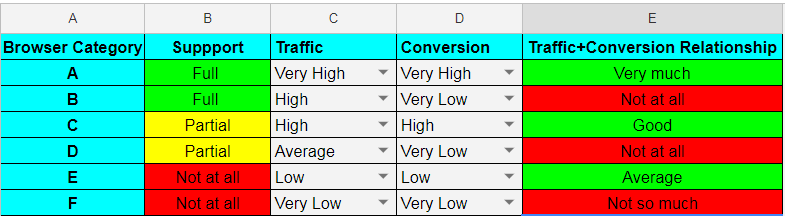
A reusable matrix template is available in this Google Sheet.
7. Implement Logging and Reporting
When a test fails inside a 500-test suite, logs are what tell you which step broke. Add structured logs at the points where intent is hardest to reconstruct from code alone: just before a critical action, after an assertion, and inside any retry or wait helper.
Standard log levels (debug, info, warning, error, critical) are available in every common binding: logging in Python, log4j or SLF4J in Java, winston in Node, and NLog or Serilog in C#. Reserve error and critical for failure paths so they stand out in CI output and avoid drowning the log in debug noise.
Pair logging with a reporting framework that produces shareable artifacts. Allure, Extent Reports, and ReportPortal are popular open-source choices. For teams running on cloud infrastructure, the TestMu AI Test Analytics dashboard captures pass/fail trends, flake rate, and per-test execution time across builds without extra plumbing. Our test reports hub covers the broader landscape.
8. Use Design Patterns and Principles i.e. Page Object Model (POM)
Page Object Model (POM) is the most widely adopted Selenium design pattern. Each page in the application gets its own class that exposes the actions a test would perform. Tests interact with the page through that class instead of touching locators directly.
When the UI changes, only the page class changes. Test scripts stay untouched. This is the difference between updating one method when a button gets a new ID, and grepping every test for that locator.
POM gives you four concrete wins:
- Centralized maintenance: a UI change touches one file, not many.
- Reusable methods: login.signIn(user, pass) can be called from any test.
- Readable tests: test bodies describe intent (cart.checkout()) instead of clicks and selectors.
- Clearer ownership: page classes mirror the application's information architecture.
A typical project layout for POM-based Selenium automation:
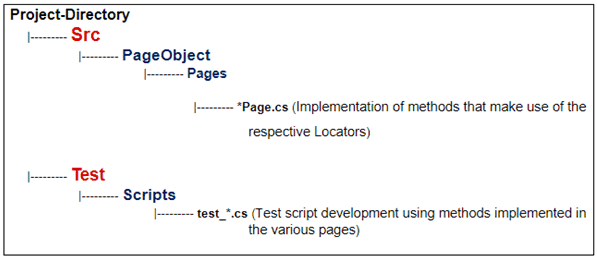
For end-to-end implementations see Page Object Model Tutorial with Java and Page Object Model Tutorial with C#. To run your POM-based suite on a cloud Grid, follow the Get Started With Selenium Testing docs.

Note: Build your Selenium suite on a cloud Grid that already has Chrome, Edge, Firefox, and Safari ready to run, no local drivers to manage. Sign up for TestMu AI free.
9. Use BDD Framework with Selenium
Behavior Driven Development (BDD) writes test cases in plain English using Gherkin syntax (Given/When/Then). Product managers, designers, and non-engineers can read and contribute to them without parsing code.
Gherkin's syntax is the same across BDD frameworks (Cucumber, Behave, SpecFlow, Reqnroll), which keeps the learning curve low if your team migrates between them. Compared to Test Driven Development (TDD), BDD scenarios stay valid longer because they describe intent, not implementation.
A sample feature file that searches for TestMu AI on DuckDuckGo:
Feature: TestMu AI search
Scenario: Search for TestMu AI on DuckDuckGo
    Given I am on the DuckDuckGo homepage
    When I enter search term as TestMu AI
    Then Search results for TestMu AI should appear
For deeper coverage, see BDD with Gherkin and our Behave BDD framework tutorial.
10. Follow a Uniform Directory Structure
A consistent directory structure makes a Selenium project navigable to anyone who joins six months later. The standard split is src/ for Page Objects, helpers, and locator definitions, and tests/ for the actual test implementations. Keep test data, fixtures, and configuration in their own folders so test logic does not mingle with environment setup.
There is no single mandated layout, but the principle is non-negotiable: separate test implementation from the framework code that supports it. Mirror the directory map shown in practice 8 above as a starting point.
11. Use Data-Driven Testing for Parameterization
A login test that hardcodes one valid email and one invalid email proves almost nothing. The same test, parameterized across 15 input combinations (empty, malformed, SQL-style, unicode, expired, locked-out, etc.) actually exercises the validation logic.
Parameterization keeps the test code small while expanding coverage. Pull inputs from CSV, JSON, or a fixture file so non-engineers can add cases without touching test logic.
Binding-specific guides:
12. Do Not Use a Single Driver Implementation
Hardcoding FirefoxDriver or ChromeDriver in your tests means the suite only works on that browser. The moment CI tries to run the same suite on Edge or Safari, every test fails before it starts.
Drive the browser type from configuration, not code. Use TestNG @Parameters or JUnit @RunWith to inject the browser at runtime, and produce a RemoteWebDriver in CI so the same script runs locally and against a remote Grid without changes.
A small WebDriver factory keeps the conditional logic out of your tests and makes adding a new browser a one-line config change.
13. Come Up with Autonomous Test Case Design
An autonomous test sets up its own preconditions, executes its scenario, and tears down its own state, with zero dependence on what ran before it. Two practical wins follow: failures are easier to triage (you know the cause is in this test, not seventeen tests upstream), and the suite parallelizes cleanly because no test holds shared state another test reads.
Tests that share state, an order, or a fixture across cases force serial execution. The runtime cost grows linearly with suite size, and a single early failure cascades into dozens of false positives downstream.
When dependency genuinely cannot be avoided, use markers like @pytest.mark.incremental and xfail in PyTest to skip downstream tests if their precondition fails. Treat that as a fallback, not a default.

14. Use Assert and Verify in Appropriate Scenarios
Use assert when the test cannot meaningfully continue if the check fails. Example: if the login page never loads, the rest of a checkout test cannot run, so an assert on the login page is correct. The execution stops, the rest of the suite gets the failure signal, and you avoid noisy cascading errors.
Use verify (soft assert) when the check is informational and the test should continue. Example: validating that a footer link is rendered correctly should not block the test from validating the main flow. Soft asserts collect failures and report them all at the end, instead of stopping at the first.
For binding-specific syntax see JUnit Asserts with Examples.
15. Leverage Parallel Testing in Selenium
Parallel testing is the single largest lever for cutting Selenium suite runtime. PyTest, PyUnit, TestNG, and Cucumber all expose a parallel execution mode, and parallel testing over a Selenium Grid lets the same suite fan out across browsers, OS versions, and device emulators in one run.
For teams that do not want to operate their own Grid hardware, a cloud-based Selenium Grid like TestMu AI handles the orchestration. TestMu AI runs Selenium suites across 3,000+ browser and OS combinations and 10,000+ real iOS and Android devices, with native plugins for the popular test frameworks and CI/CD tools.
Once the Grid handles execution, your Selenium scripts stay the same. The only change is swapping the local WebDriver hub URL for the remote one and adding capabilities for browser, OS, and build name.
Bonus Tip – Now that we have looked at the top 15 Selenium best practices, it is time, we also deep dive into some of the worst Selenium practices that should be avoided when performing automation testing with Selenium!
What Are Worst Practices for Automation Testing with Selenium?
Avoid using Selenium for file downloads, CAPTCHA solving, two-factor authentication flows, link spidering, login automation against Gmail or Facebook, inter-dependent tests, and performance benchmarking. Each of these is either against the third-party service's terms of use, technically unreliable, or simply outside what Selenium is designed for.
Below are seven anti-patterns to keep out of your Selenium suite.
1. File Downloads
A user-driven download starts with a click on a link or button. Selenium can drive that click, but the WebDriver API does not expose download progress, completion, or the path to the saved file. You end up scraping the file system to know whether the download succeeded, which is slow and brittle.
A reliable alternative: locate the download link with Selenium, capture any required cookies, then pass both to an HTTP request library like libcurl, requests, or HttpClient. The HTTP layer reports status codes and bytes-transferred deterministically.
2. CAPTCHAS
CAPTCHA (Completely Automated Public Turing test to tell Computers and Humans Apart) exists specifically to block automation. Trying to defeat one with Selenium is a losing arms race that will also rate-limit or ban your test accounts.
In test environments, the right move is to disable CAPTCHA via a feature flag or test-only header, or to add a backdoor that bypasses the check for a designated test-user pool. Production CAPTCHAs stay intact; the test path stops fighting them.
3. Two-Factor Authentication (2FA)
2FA generates a time-based one-time password (TOTP) on a separate device or authenticator app. Selenium has no clean way to read that code, and screen-scraping a phone over ADB is fragile.
Disable 2FA for a dedicated test-user pool, or whitelist the test runner's IP range so 2FA is bypassed from CI. Both leave production behavior intact while letting the suite log in.
4. Link Spidering (or Crawling)
A web crawler walks pages systematically and collects links. Selenium can do this, but each page load includes a full browser startup and DOM parse, which is orders of magnitude slower than an HTTP-only crawler.
Use curl, requests with BeautifulSoup, or a dedicated tool like Scrapy for crawling. Reserve Selenium for actual UI interactions where the JavaScript rendering matters.
6. Avoid Test Dependency
Tests that depend on each other cannot run in parallel, and a failure in test A makes test B fail for the wrong reason. The same suite that passes in serial can fail unpredictably when CI shuffles execution order. Make every test self-sufficient (see practice 13).
7. Performance Testing
Selenium drives a real browser, which means every measured timing includes browser startup, JavaScript parsing, network jitter, and rendering cost. None of those are under the tester's control, so timing measurements are noisy and not comparable across runs.
For performance testing, use a tool designed for it: JMeter, Gatling, or k6 for load and stress, Lighthouse for browser-side rendering metrics. Selenium remains the right tool for functional and cross-browser correctness.
Conclusion

A reliable Selenium suite is the product of three habits: replace blocking sleeps with explicit waits, layer Page Objects between tests and the DOM, and run tests in parallel against a real-browser Grid so flakiness shows up at scale instead of in production.
Three-step quickstart with TestMu AI:
- Sign up for a free TestMu AI account and grab your username and access key.
- Point your Selenium WebDriver at https://hub.lambdatest.com/wd/hub with LT:Options capabilities. Step-by-step setup is in the Get Started With Selenium Testing docs.
- Validate against the Selenium Playground first, then connect your Selenium automation suite for parallel cross-browser runs against the latest version of Selenium.
From there, work down the 15 best practices in this guide. Apply one per sprint and most teams measurably reduce flake rate within a quarter.
Note: This article was researched and drafted with AI assistance, then reviewed, fact-checked, and published by Himanshu Sheth, Director of Marketing (Technical Content) at TestMu AI, whose listed expertise includes Selenium and Automation Testing. Every code snippet, link, and product claim was verified against primary sources. Read our editorial process and AI use policy for details.




Frequently asked questions
Did you find this page helpful?
More Related Hubs
TestMu AI forEnterprise
Get access to solutions built on Enterprise
grade security, privacy, & compliance
- Advanced access controls
- Advanced data retention rules
- Advanced Local Testing
- Premium Support options
- Early access to beta features
- Private Slack Channel
- Unlimited Manual Accessibility DevTools Tests